
Blog
Using Dropbox as a Project Management Tool
 Ross Johnson
If you are anything like me you started designing on the web because you loved design, not because you wanted to be a project manager. Having met countless agency owners and freelancers it is abundantly clear that while project management is essential to the success of any web project most people struggle with the “best way” to go about it. The complexity of managing multiple people working on the same project means that there will be instances where everyone needs access to the same files and information and most likely at unknown times.
This is compounded at 3.7 DESIGNS since we lean towards virtual teams and have part time interns. While we have always used Basecamp to great success there are things it does extremely well and others it does not. Having read ReWork it is pretty clear this is by design… but where does that leave us in our needs?
An Unlikely Hero…
We have recently started adopting DropBox as a supplement to our project management approach. While DropBox was originally intended for easy cloud based storage of files it actually is an extremely powerful tool for managing projects. Not only is it a very fast method of organizing, modifying and changing files but it also uses a format that everyone who is used to a computer is extremely familiar with.
How it All Works
If you are regularly working with teams then you are probably familiar with the three primary methods of communication… voice, e-mail and document. We have meetings in person or via phone, communicate electronically in the form of quick messages (not always e-mail but primarily) and then we share documents. Documents may be reports, spreadsheets, design comps, etc…
While DropBox probably isn’t going to be a great method of handling voice / e-mail it does do a great job at the document management portion. When you look at the scope of a web design project in particular you end up with lots and lots of documents that people on your team will need to access, modify and update at random times. This includes:
- Content
- Photos
- Artwork
- Strategy / scope / spec
- DEV site access
- Design concepts
- Instructions
Rather than try and upload those all into Basecamp and require logins, uploads, tagging, etc… it is much easier to drop them into a folder you share with the project team and be on your merry way. That way when someone updates a file you are instantly privy to the changes. This is especially useful if you have well documented processes / instructions where new team members can quickly jump in, learn what they need to know and get moving with out tying up another resource.
Folder Structure
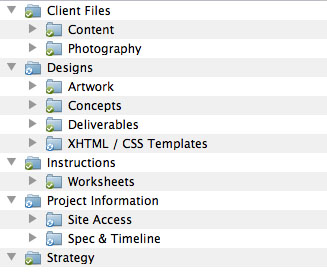 You can really structure your folders for projects any way you would like. I have found that having consistency makes it much easier to move from project to project so I would recommend thinking out what folders you need and how to group them. While always tweaking we have settled on the following break down:
- Project Information
- Site Access
- Spec & Timeline
- Instructions
- Worksheets
- Client Files
- Content
- Photography
- Strategy
- Designs
- Artwork
- Concepts
- Deliverables
- XHTML/CSS Templates
Plus… it is Free
If you are skeptical I recommend giving it a shot. Everyone on your team can sign up for a free DropBox account where you get 2GB for free. I encourage you to sign up and give it a try. Worst case it is a great tool to have for your own files with features such as version control, online file sharing and redundant backups.